

Automate Jira Ticket Creation from Google Forms with n8n
Are you looking for a streamlined way to manage incoming requests and tasks directly in Jira? Tired of manual data entry or complex integrations? This comprehensive guide will walk you through setting up an automated workflow that seamlessly converts Google Form submissions into Jira issues using n8n. This solution is perfect for Product / Ops teams, Engineering managers, and Project managers seeking efficient intake and tracking.
Request Portals
If you’re running request portals on Google Forms and want to automate the creation of corresponding Jira tickets, this solution is for you. n8n’s no-code automation capabilities provide a powerful and flexible way to connect these two platforms efficiently. Learn more about our automation services.
Jira Integration
Engineering managers often need quick Jira integration without the overhead of building custom user interfaces. This approach avoids complex coding and allows for rapid deployment of a request-to-Jira workflow.
Project Management
Project managers who currently track intake in Google Sheets but desire the robust features of Jira will find this solution highly beneficial. Consolidate your requests in a centralized Jira environment without manually transferring data.
Controlled Ticket Creation
Organizations aiming for controlled ticket creation without directly exposing Jira to all users will appreciate this approach. n8n acts as a secure intermediary, ensuring only authorized requests trigger Jira issue creation.
Technical Requirements
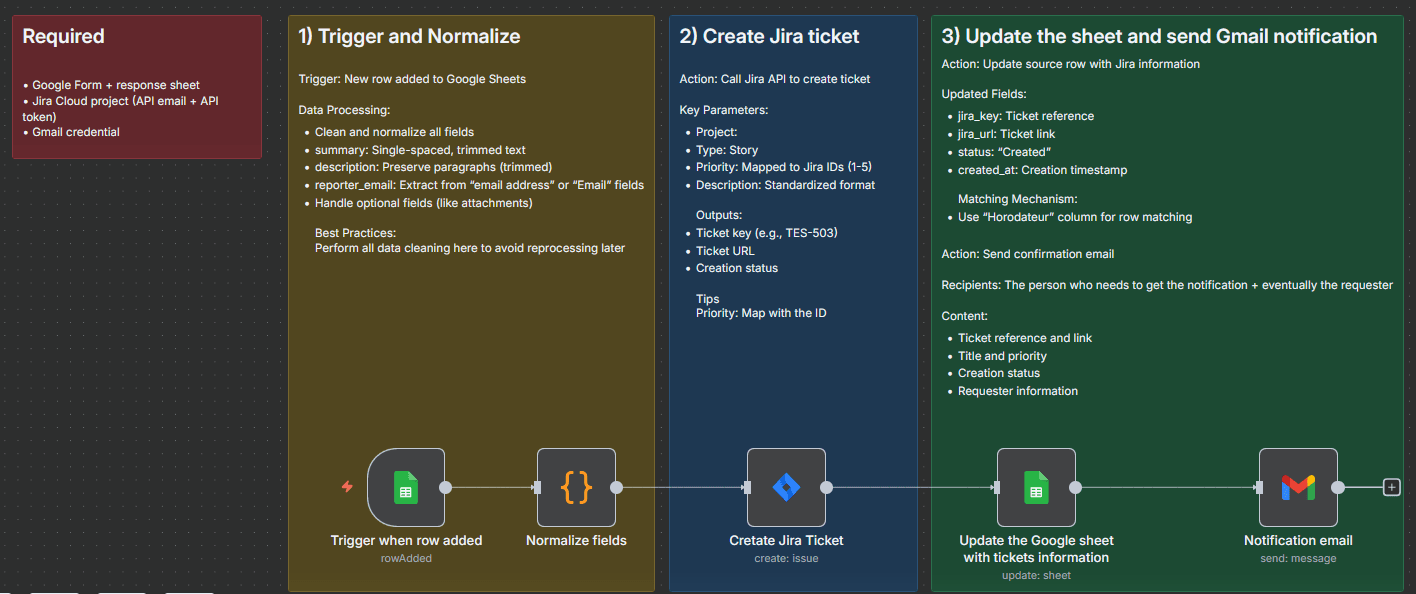
- A configured Jira Cloud project.
- A Jira Cloud API email address and API token with “Create issues” permission.
- A Google Form with a response sheet.
- A Gmail credential for sending notifications.
Workflow Steps
Here’s a breakdown of the workflow using n8n:
- Trigger: A row is added to the Google Form response sheet.
- Normalize Fields: Trim and clean the text data from the Google Form responses to ensure consistency. This includes standardizing titles, descriptions, and labels.
- Create Jira Issue: Use the n8n Jira module to POST data to the Jira REST API. Employ safe mappings to ensure data is correctly transferred and validated.
- Update Google Sheet: Update the original Google Sheet with the generated Jira key and other relevant information (status, updated date). Match rows by either the “Horodateur” timestamp or the row number.
- Send Gmail: Send an HTML email notification containing the Jira issue key, title, link, priority, and requester details.
Key Features
- Real-time Updates: The workflow runs in real-time, triggered immediately upon a new form submission. No polling is required.
- Idempotent Updates: Utilizes the “Horodateur” timestamp from the Google Form to prevent duplicate Jira issues if the form is submitted multiple times.
- Clean Normalization: Standardizes summary, description, and labels for consistent Jira issue creation.
- Safe Jira Mappings: Priority is mapped using Jira priority IDs for accurate representation.
- Detailed Notifications: Sends branded HTML emails with all key Jira issue fields.
Expected Output
- A new Jira issue is created in the configured project.
- The Google Sheet is updated with the Jira key, issue URL, status, and last updated timestamp.
- A notification email is sent to relevant stakeholders and the form requester.
How it Works
The n8n workflow starts with a Google Form trigger, initiating the process whenever a new submission is made. The data from the form is then normalized to ensure consistency. This normalized data is used to create a new issue in Jira via a POST request to the Jira REST API. The Google Sheet is updated to link the form submission to the newly created Jira issue, and a notification email is automatically sent. This automation significantly reduces manual effort and improves the efficiency of your request management process. For more advanced integration needs, consider exploring [n8n’s integrations](https://n8niostorageaccount.blob.core.windows.net/n8nio-strapi-blobs-prod/assets/n8n-integrations.png).
n8n enables powerful integrations without the need for extensive coding. Want to explore more automation possibilities? Check out our latest blog posts for inspiration, or delve into our Microsoft 365 Copilot integration and other solutions. If you’re looking for comprehensive automation solutions, explore our range of services.
This workflow can be further customized to include additional data transformations, conditional logic, and error handling.
Explore n8n’s documentation for detailed instructions on setting up this workflow: [n8n Documentation](https://developer.n8n.io/).
For further support and custom development, please contact us. [Contact Us](https://backrun.us/contact).
[External Link 1], Jira, Google Forms, Google Sheets, Gmail API.