

Automate Jira Ticket Creation from Google Forms with n8n
Streamline your workflow and eliminate manual data entry by automating Jira ticket creation directly from Google Forms. This powerful integration, built with n8n, connects your existing systems and ensures efficient project intake. Whether you’re managing requests for Product / Ops teams, needing quick Jira integration without custom UI for engineering, or tracking intake in Google Sheets as a project manager but wanting Jira as your central hub, this solution is designed for you.
At Backrun, we specialize in building custom automation solutions to boost your team’s productivity. This guide will walk you through setting up a seamless process to create Jira issues from Google Forms responses, freeing up valuable time and reducing the risk of errors.
Who Is This For?
- Product / Ops Teams: Easily manage feature requests, bug reports, and other incoming requests without switching between applications.
- Engineering Managers: Get quick Jira integration without the overhead of developing custom user interfaces.
- Project Managers: Track intake in Google Sheets and effortlessly create corresponding Jira tickets.
- Organizations with Controlled Ticket Creation: Ensure standardized ticket creation processes without directly exposing Jira to users.
Technical Requirements
Before you begin, ensure you have the following:
- A configured Jira Cloud project.
- A Jira Cloud API email address and API token with “Create issues” permission.
- A Google Form set up to collect request information.
- A Google Sheet linked to your Google Form responses.
- A Gmail account with credentials for sending notifications.
Workflow Steps
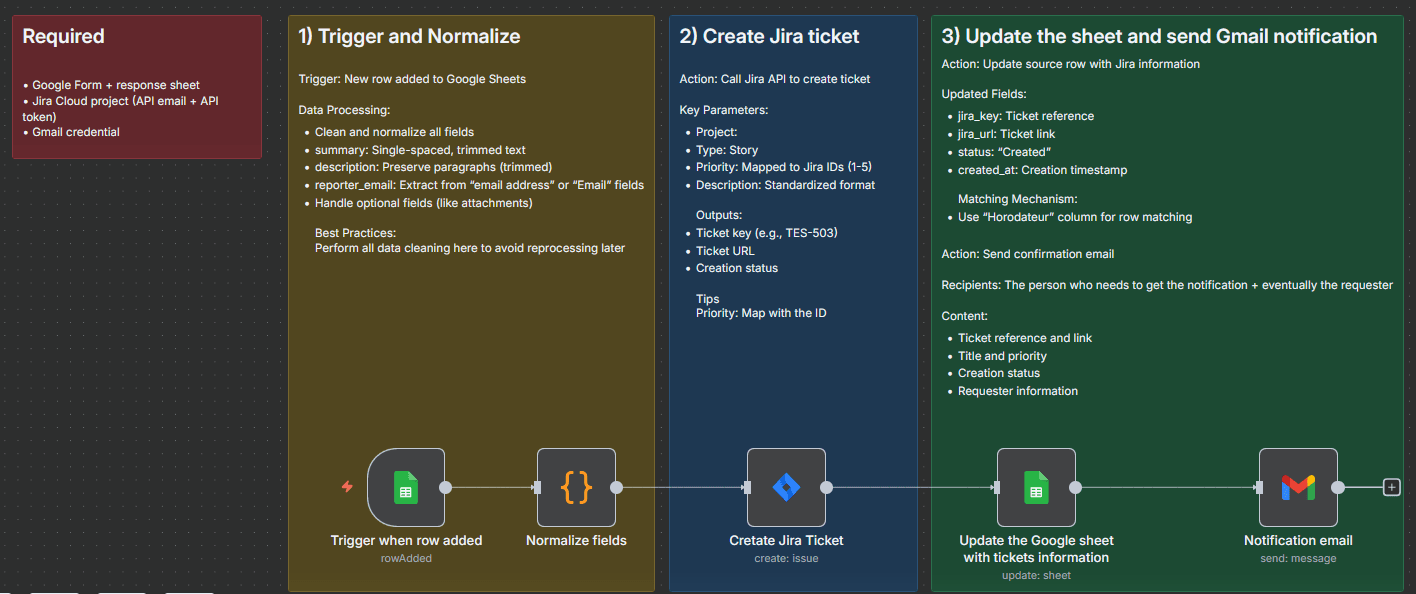
- Trigger: The automation is triggered whenever a new row is added to your Google Form response sheet.
- Normalize Fields: The workflow normalizes the data by trimming whitespace and cleaning text fields to ensure consistency.
- Create Jira Issue: A POST request is sent to the Jira REST API to create a new issue. This step includes safe mappings of form fields to Jira fields.
- Update Google Sheet: The Google Sheet is updated by matching the form response (using either “Horodateur” or `rowNumber`) and writing the Jira key, issue URL, status, and updated timestamp.
- Send Gmail: A branded HTML email is sent to the requester and/or stakeholders, containing the Jira issue key, title, link, priority, and other relevant information.
Key Features
- Real-time Automation: The workflow operates in real-time, triggered directly from your Google Form responses without the need for polling. This is a key benefit over many traditional integration methods.
- Idempotent Updates: The workflow uses the Form timestamp (“Horodateur”) to ensure that duplicate entries are handled gracefully, preventing accidental duplicate Jira issues.
- Clean Normalization: The workflow standardizes your data by cleaning and normalizing summary, description, and label fields, ensuring consistency in Jira.
- Safe Jira Mappings: Priority is mapped to Jira values using their IDs, avoiding potential errors caused by inconsistent priority names.
- Branded Notifications: Notifications are sent via customizable HTML emails, providing a professional and branded experience.
Expected Output
This automation delivers the following results:
- A new Jira issue is created with data populated from the Google Form response.
- The Google Sheet is updated with the newly generated Jira key, issue URL, status, and timestamp.
- A confirmation email is sent to the requester and/or relevant stakeholders.
How It Works
The integration leverages the power of n8n, an open-source workflow automation platform, to connect Google Forms and Jira. The flow begins with a Google Forms trigger, followed by data normalization and a POST request to the Jira API. The workflow then updates the Google Sheet to track the Jira issue and sends a notification email. This approach eliminates the need for complex coding and provides a user-friendly interface for managing your integrations. For more complex automation needs, consider exploring our automations services.
This solution is a prime example of how integration platforms like n8n can simplify complex workflows. If you’re looking to enhance your team’s efficiency and streamline your project management, explore how Backrun can assist you. Learn more about how our automation solutions can benefit your organization on our blog.
Furthermore, as organizations increasingly leverage AI, seamless integrations become even more critical. Explore how Backrun is incorporating cutting-edge technologies like Microsoft 365 Copilot to enhance automated workflows.
For further information on our integration capabilities and how we can tailor solutions to your specific needs, contact us today.
Resources:
- n8n Documentation: [object Object]
- Google Forms Documentation: [object Object]
- Jira API Documentation: [object Object]
- Gmail API Documentation: [object Object]
- Backrun Case Studies: [object Object]
- Backrun Pricing: [object Object]
- Explore our other integrations: [object Object]
- Learn more about workflow automation: [object Object]
- Discover the power of open-source automation: [object Object]
- Find out how we help businesses thrive: [object Object]
- Get in touch with our team: [object Object]
- Read our customer testimonials: [object Object]
- Explore our partner ecosystem: [object Object]